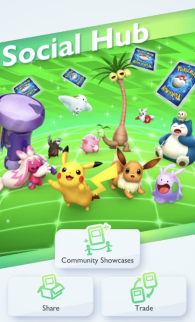

So you’ve been getting plenty of cards and you’re happy with your collection, but you see some cards that you like and you haven’t been able to obtain them so far and you really want them, what do you do? You access the Social Hub where you can share and trade cards with your friends!
To find the Social Hub press the middle button on the bottom of the screen. You’ll be taken to a menu with a few different options; Community Showcases, Share, Trade and Friends. We’ll get to the Community Showcase option when we talk about creating decks and showing off those cards so this won’t be a focus in this article. Firstly in order to share and trade cards with other players you first need to add them as friends! To search for friends in-game, go to the Friends menu and select the icon next to the “Number of Friends” text. If you want to find a specific player you will need their friend ID (your own ID can be found in this menu). You may also get friend requests from people who Wonder Picked your packs or who’ve recently battled you. You can accept these requests in the Friends menu by selecting Approve and then accepting the request!

Once you’ve made some friends in-game it’s time to share and trade together! Sharing cards is the much easier method of the two as it doesn’t involve the other player at all! When you select the Share option select a friend who you want to give a card to and it will show cards that aren’t in that player’s Card Dex. Once you’ve selected a card simply press the Share button and the card is sent to that player! However, there are a couple of notes to point out; once you share a card with a player you won’t be able to get that card back unless that player gives it back to you so make sure you don’t share any cards that are precious to you! You can also only share cards with rarity levels of 1-4 diamonds and are only able to share cards with a player once per day.
Trading cards is a little more in depth! The method for starting a trade is exactly the same as Sharing, but the Trade option has a lot more leeway with which cards to trade. You can select most cards to trade with your friends regardless of rarity going from 1 diamond to rare Shiny Pokémon! However you won’t be able to trade any Crown rarity level cards since they’re the rarest cards in the game. Another thing to note is that the higher value the card is the more Shinedust you will need in order to trade that card (which is another currency we’ll go into when talking about creating decks). The last important thing to note is that trading cards also requires its own currency; Trade Stamina. This Stamina works in a similar way to Wonder Hourglasses where you can recover Stamina through hourglasses, in this case Trade Hourglasses which are obtainable through completing missions. Each trade will use up 1 Trade Stamina and once you run out you will need to spend Trade Hourglasses to recover. Once both players have selected their cards to trade, press the Trade button and you both get each other’s cards! You can also trade cards with the same player multiple times until you run out of Trade Stamina.